
The Brain Behind the Build:
How I Use Obsidian to Manage
Multiple Empires

For a Systems Partner, organization isn’t just about “neatness”—it’s about retrieval speed and structural integrity. For years, I struggled with “Digital Junk Drawer” syndrome. I had scattered Word docs, lost Google Drive folders, and business ideas for Jhaydzcrafts Handmade buried under client research for Join Me Virtual. I was working hard, but I was being a “cog” in my own chaotic machine.
After 18 years of operational grit—15 in Corporate Real Estate and 3 in the digital space—I knew I needed a system that could handle the weight of multiple brands without the “Expensive Sand” of high-tier subscriptions.
That changed when a developer friend introduced me to Obsidian.
Why a Systems Architect Swapped Cloud Chaos for a “Local Vault”
Most people are used to cloud-based tools that charge a monthly fee to hold your data hostage. Obsidian is different. It is a local-first knowledge base that sits on your computer. It uses simple Markdown files, meaning the “Digital Plumbing” is lightweight, fast, and entirely yours.
Here is the logic of how I’ve built my “Compartmentalized Control Room”:
1. The “Vault” vs. The Folder
In a traditional system, files are buried in folders where they go to die. In my Obsidian Vault, I use a Knowledge Graph. Every note can be linked to another using [[Internal Links]].
- The Benefit: When I research a new optimization for a client, I can link it directly to a previous “Systems Audit.” My business brain becomes a web of connected ideas, not a stack of isolated papers.
2. My Actual Folder Structure (The “Compartments”)
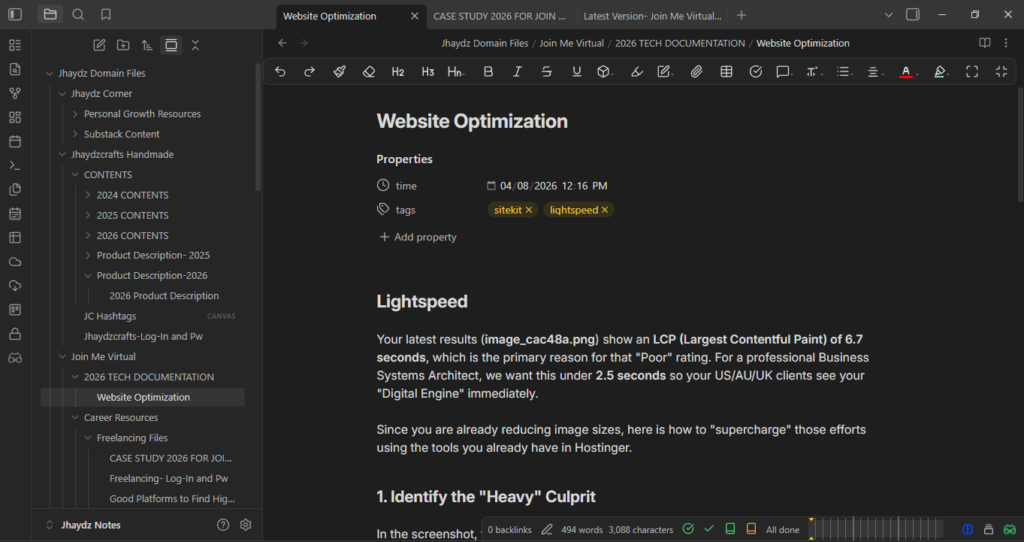
As seen in the screenshot of my actual workspace, I follow a strict structural boundary to keep my focus sharp:
- Jhaydz Corner: My personal growth and Substack content.
- Jhaydzcrafts Handmade: Where my macrame patterns, product descriptions, and creative 2026 contents live.
- Join Me Virtual: This is my professional engine. It houses my 2026 Tech Documentation, website optimization logs, and career resources.
3. Lean Efficiency (The $0 Setup)
Obsidian is free for personal use. For a founder building on a budget, this is the ultimate “Lean Engine.” It saves computer space because it doesn’t rely on heavy caching, and it works offline—meaning my “engine” never goes down when the internet does.
The Logic of a “Leak-Proof” Build
Building a system in Obsidian is like laying the pipes for a building. You have to consider the Heart and the Soul:
- The Heart (The Backend): This is the grit, the documentation, and the logical flow of your files.
- The Soul (The UI): This is how you feel when you move through your vault. If it’s cluttered, your mind stays cluttered.
By compartmentalizing my brands, I ensure that my creative energy for crafts never gets tangled in the technical logic of my systems architecture.
How to Start Your Own Build
If you are ready to move from manual chaos to structural integrity, here is how to begin your Obsidian journey:
- Download: Visit Obsidian.md and install it on your machine.
- Set Your Vault: Choose a folder on your computer to be your “Control Room.”
- Learn the Basics: Since I am not a developer, I relied on the community to learn the ropes.
Is this the blueprint you’ve been looking for? I am only scratching the surface of what is possible within this “Control Room.” If you want me to dig deeper into the technical setup—including the specific automated templates I use for client onboarding and how I link my research to live projects—let me know in the comments below. If there is enough interest, I’ll pull back the curtain even further with a detailed, step-by-step walkthrough.
Moving from Manual Chaos to Structural Integrity
If you’ve reached this part of the guide, you see the potential. You want a “Control Room” that doesn’t cost a fortune but offers professional-grade organization.
However, there is a key distinction to remember.
Disclaimer: I am not affiliated with Obsidian. It is a powerful, free tool, but “Free” platforms often require significant manual setup and technical “hardening.” If the pipes aren’t laid correctly from Day 1, a free tool can become just another source of manual chaos.
Let’s Build Your Engine Together
This is exactly where Join Me Virtual comes in. You don’t have to spend years learning the “Digital Plumbing” of every new tool.
Whether you need a Full Strategic Build to house your multiple businesses or a Systems Audit to find where your current operations are leaking revenue, I am here to ensure your tools work for you—not the other way around.
Stop being a cog in your own machine. Become the Architect of your vision.
👉 Explore My Service Catalog & Work With Me
Your Turn to Architect: Systems are meant to evolve. I’ve shared my current “Digital Plumbing,” but I want to hear from you. Are you struggling with a “Digital Junk Drawer” of your own? Would a deep-dive tutorial on my specific Obsidian workflow help you clear the chaos?
Drop a comment or send me a message through the contact form. Your feedback determines what I build and share next. Let’s stop managing the manual nightmare and start building with intent.
Lastly, subscribe to get my fresh insights and resources sent directly to your inbox.
The Brain Behind the Build:
How I Use Obsidian to Manage Multiple Empires
For a Systems Partner, organization isn’t just about “neatness”—it’s about retrieval speed and structural integrity. For years, I struggled with “Digital Junk Drawer” syndrome. I had scattered Word docs, lost Google Drive folders, and business ideas for Jhaydzcrafts Handmade buried under client research for Join Me Virtual. I was working hard, but I was being a “cog” in my own chaotic machine.
After 18 years of operational grit—15 in Corporate Real Estate and 3 in the digital space—I knew I needed a system that could handle the weight of multiple brands without the “Expensive Sand” of high-tier subscriptions.
That changed when a developer friend introduced me to Obsidian.
Why a Systems Architect Swapped Cloud Chaos for a “Local Vault”
Most people are used to cloud-based tools that charge a monthly fee to hold your data hostage. Obsidian is different. It is a local-first knowledge base that sits on your computer. It uses simple Markdown files, meaning the “Digital Plumbing” is lightweight, fast, and entirely yours.
Here is the logic of how I’ve built my “Compartmentalized Control Room”:
1. The “Vault” vs. The Folder
In a traditional system, files are buried in folders where they go to die. In my Obsidian Vault, I use a Knowledge Graph. Every note can be linked to another using [[Internal Links]].
- The Benefit: When I research a new optimization for a client, I can link it directly to a previous “Systems Audit.” My business brain becomes a web of connected ideas, not a stack of isolated papers.
2. My Actual Folder Structure (The “Compartments”)
As seen in the screenshot of my actual workspace, I follow a strict structural boundary to keep my focus sharp:
- Jhaydz Corner: My personal growth and Substack content.
- Jhaydzcrafts Handmade: Where my macrame patterns, product descriptions, and creative 2026 contents live.
- Join Me Virtual: This is my professional engine. It houses my 2026 Tech Documentation, website optimization logs, and career resources.
3. Lean Efficiency (The $0 Setup)
Obsidian is free for personal use. For a founder building on a budget, this is the ultimate “Lean Engine.” It saves computer space because it doesn’t rely on heavy caching, and it works offline—meaning my “engine” never goes down when the internet does.
The Logic of a “Leak-Proof” Build
Building a system in Obsidian is like laying the pipes for a building. You have to consider the Heart and the Soul:
- The Heart (The Backend): This is the grit, the documentation, and the logical flow of your files.
- The Soul (The UI): This is how you feel when you move through your vault. If it’s cluttered, your mind stays cluttered.
By compartmentalizing my brands, I ensure that my creative energy for crafts never gets tangled in the technical logic of my systems architecture.
How to Start Your Own Build
If you are ready to move from manual chaos to structural integrity, here is how to begin your Obsidian journey:
- Download: Visit Obsidian.md and install it on your machine.
- Set Your Vault: Choose a folder on your computer to be your “Control Room.”
- Learn the Basics: Since I am not a developer, I relied on the community to learn the ropes.
Is this the blueprint you’ve been looking for? I am only scratching the surface of what is possible within this “Control Room.” If you want me to dig deeper into the technical setup—including the specific automated templates I use for client onboarding and how I link my research to live projects—let me know in the comments below. If there is enough interest, I’ll pull back the curtain even further with a detailed, step-by-step walkthrough.
Moving from Manual Chaos to Structural Integrity
If you’ve reached this part of the guide, you see the potential. You want a “Control Room” that doesn’t cost a fortune but offers professional-grade organization.
However, there is a key distinction to remember.
Disclaimer: I am not affiliated with Obsidian. It is a powerful, free tool, but “Free” platforms often require significant manual setup and technical “hardening.” If the pipes aren’t laid correctly from Day 1, a free tool can become just another source of manual chaos.
Let’s Build Your Engine Together
This is exactly where Join Me Virtual comes in. You don’t have to spend years learning the “Digital Plumbing” of every new tool.
Whether you need a Full Strategic Build to house your multiple businesses or a Systems Audit to find where your current operations are leaking revenue, I am here to ensure your tools work for you—not the other way around.
Stop being a cog in your own machine. Become the Architect of your vision.
👉 Explore My Service Catalog & Work With Me
Your Turn to Architect: Systems are meant to evolve. I’ve shared my current “Digital Plumbing,” but I want to hear from you. Are you struggling with a “Digital Junk Drawer” of your own? Would a deep-dive tutorial on my specific Obsidian workflow help you clear the chaos?
Drop a comment or send me a message through the contact form. Your feedback determines what I build and share next. Let’s stop managing the manual nightmare and start building with intent.
Lastly, subscribe to get my fresh insights and resources sent directly to your inbox.
Maximize Your Business Engine
Get the weekly briefing that turns operational chaos into structural integrity. Tactical tips, CRM architecture insights, and tool suggestions to ensure your business is leak-proof.